
Installation
Clone the repository (git clone https://github.com/TerminalDZ/vidcreat.git) or unpack a release archive anywhere you like (for example Documents/ReelForge). Avoid folders synced by OneDrive or iCloud for faster renders.
Windows 10 / 11
- Install Node.js 22 LTS from https://nodejs.org (keep the default options). If it is missing, the installer can install it for you with
winget. - Double-click
install.bat. It will:- check Node.js,
- offer to install ffmpeg with
winget(answer Y), - install ReelForge's dependencies,
- download the pinned Chromium browser used for rendering,
- run a full environment check.
- Double-click
start.batto open the dashboard.
If Windows SmartScreen warns about the script, choose More info → Run anyway. If ffmpeg was just installed, close and reopen
start.batso Windows picks up the new PATH.
macOS
Install Node.js 22 LTS from https://nodejs.org and Homebrew from https://brew.sh.
Open Terminal in the ReelForge folder (Finder → right-click the folder → New Terminal at Folder) and run:
bash./install.shAnswer Y when it offers
brew install ffmpeg.Double-click
ReelForge.command(or run./start.sh) to open the dashboard.
Linux
./install.sh          # add --yes to accept every prompt
./start.sh            # opens the dashboard
The installer uses your package manager (apt, dnf, pacman or zypper) for ffmpeg and can install Chromium's system libraries (it asks for sudo).
From source (developers)
git clone https://github.com/TerminalDZ/vidcreat.git && cd vidcreat
corepack enable && pnpm install && pnpm build && pnpm reelforge doctor --fix
The contributing guide covers the full development setup on each system.
Check your setup at any time
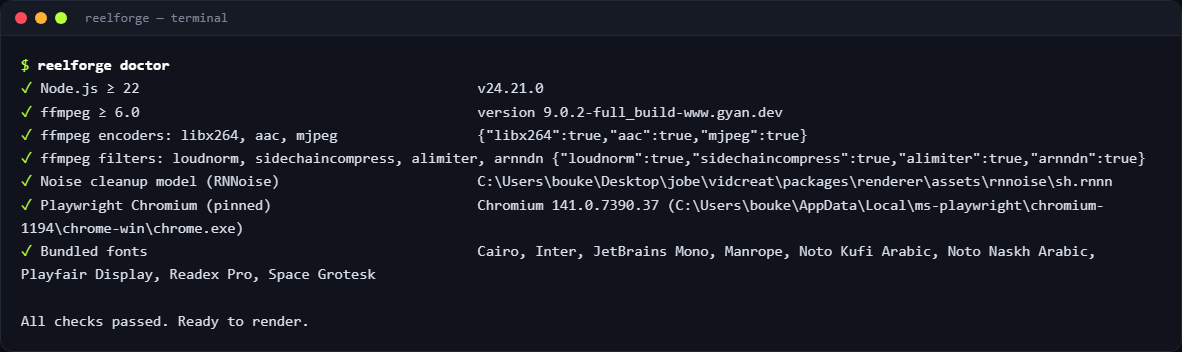
reelforge doctor # Windows: reelforge.cmd doctorIt checks Node.js, ffmpeg (version, encoders and filters), Chromium and the bundled fonts, and prints the exact fix for anything missing. The dashboard shows the same check as the status pill in the top bar.
Optional speech models
Automatic cue alignment works without any download (pause detection over the known script). For word-level accuracy with music in the background, install the optional speech models once (about 180 MB):
reelforge align --setup     # downloads Whisper and Silero VAD into your user cache
reelforge align --status    # shows what is installed
Troubleshooting
| Symptom | Fix |
|---|---|
| The dashboard says “setup issues” | Click the pill: each failed check shows its fix. Most often ffmpeg is missing. |
ffmpeg not found | Windows: winget install Gyan.FFmpeg; macOS: brew install ffmpeg; Linux: your package manager. Then open a new terminal or start.bat. |
| “Cannot launch Chromium” | Run reelforge doctor --fix. On Linux, run the installer again and accept the system libraries prompt. |
| ffmpeg installed but still not found (Windows) | Close every terminal and start.bat, then reopen: Windows only picks up the new PATH in new windows. |
pnpm is not recognized | Run corepack enable once (Node.js 22 ships Corepack), then open a new terminal. |
| Renders are slow or fail with disk errors | Move the folder out of OneDrive or iCloud and keep about 2 GB free for temporary files. |
More answers are in FAQ and troubleshooting.
Updating
If you cloned the repository, run git pull, then run the installer again (or pnpm install && pnpm build).
If you downloaded a release archive, download the new version from the releases page, unpack it next to the old one, copy your episodes/ folder (and any custom themes/ or presets/) into the new folder, then run the installer again. Your episodes are plain files: nothing else needs migrating.
Uninstalling
Delete the ReelForge folder. The Chromium download lives in your user cache folder (%LOCALAPPDATA%\ms-playwright on Windows, ~/Library/Caches/ms-playwright on macOS, ~/.cache/ms-playwright on Linux) and can be deleted too. The optional speech models from reelforge align --setup live in reelforge inside the same cache folder (%LOCALAPPDATA%\reelforge, ~/Library/Caches/reelforge, ~/.cache/reelforge).