
Introduction and concepts
ReelForge turns a voice recording and one YAML file into a finished vertical explainer video: 1080×1920 at 30 fps, ready for TikTok, Instagram Reels and YouTube Shorts.
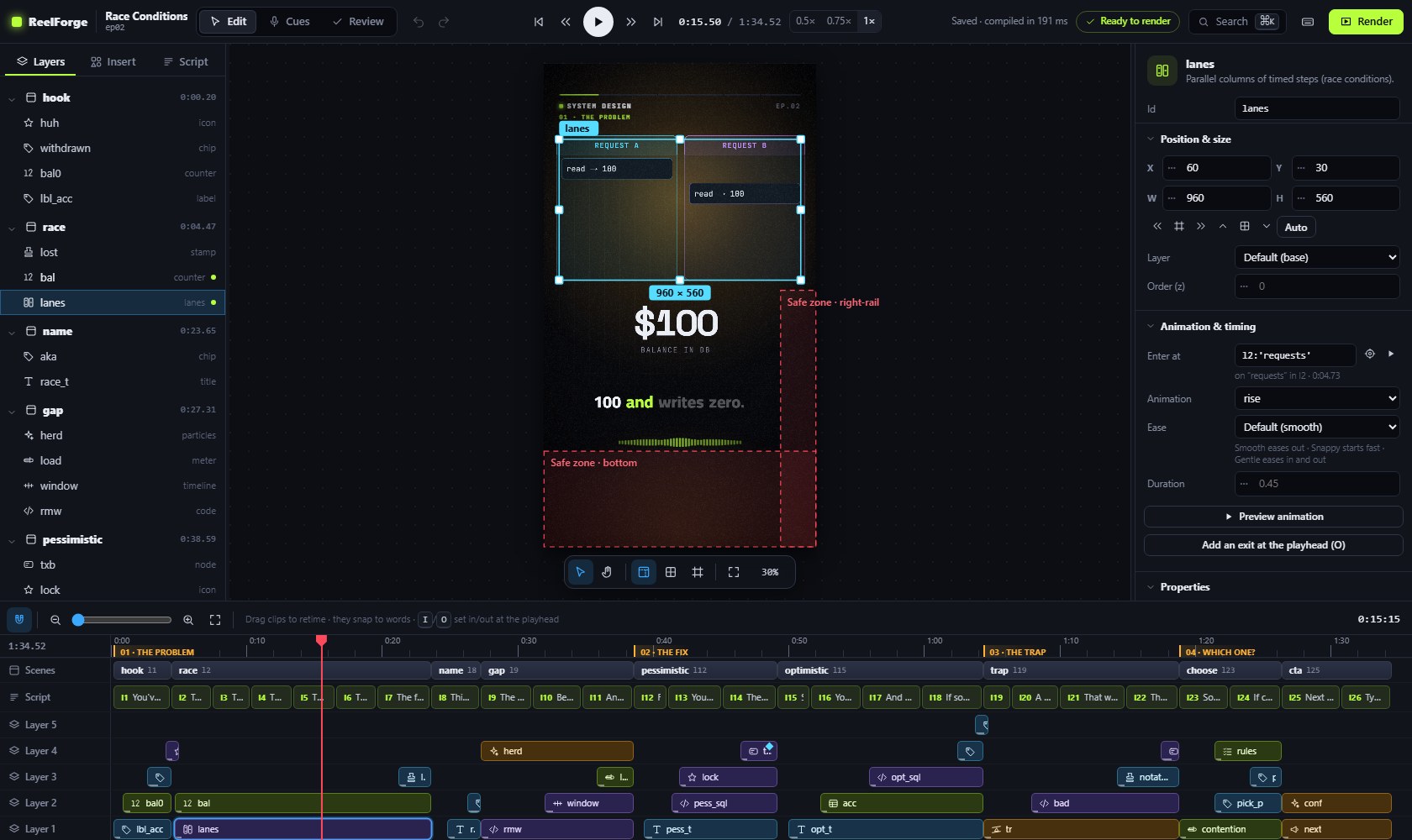
You write what you say, sentence by sentence, and describe what appears on screen and on which word. ReelForge animates diagrams, code, tables, charts and titles exactly when you say them, adds word-by-word captions, sound effects and series branding, masters the audio and encodes platform-ready files.
Highlights
- A real editor, made simple. Place components on the frame like in a design tool, retime them on a timeline like in a video editor, edit every property in the inspector, with undo, smart guides, a command palette and keyboard shortcuts for everything.
- Timed to your words. Elements appear on the word that names them. Re-record a sentence and everything after it stays in sync, because animations follow your words, not seconds.
- English and Arabic. Word-by-word captions in English, and in Arabic with correct right-to-left layout when English terms are mixed in:
الـ clientstays together and؟lands on the correct side. - Templates for many sectors. Industry packs (healthcare, real estate, logistics, education, finance and more) give you ready templates: fill in a few fields and the episode is designed for you.
- Works with AI assistants (optional). A built-in MCP server and a REST API let Claude, Cursor, Copilot, Codex, Gemini and other clients write scripts, build scenes and check frames for you.
- Animated components for explainers: nodes and arrows with moving packets, code that types itself, charts, steps and flows, tables, timelines, meters, counters, a phone mock, stamps…
- Professional sound: procedural sound effects on every hit and transition, voice mastered to −14 LUFS (the platforms' loudness target), effects ducked under the voice.
- Platform-ready output: an archival master MP4, a share MP4 that fits the upload limit you choose, SRT captions, a contact sheet and a
publish.mdwith your caption, hashtags and pinned comment. - No AI in the render engine. Frames are drawn by a deterministic engine and encoded by FFmpeg. It never generates voices or visuals: your voice, your words, your design, consistent every time.
- Optional local helpers. Speech alignment marks every line and word from your recording, and scene suggestions propose a component for a line. Both run on your computer, and you can always mark cues by ear and design scenes yourself instead.
- Offline and private. Everything runs on your computer. No account, no subscription, no upload.
reelforge align --setupdownloads the optional speech models once; after that, everything runs offline. - Deterministic. The same inputs always produce the same frames.
Concepts
| Term | Meaning |
|---|---|
| Episode | One video: a folder episodes/<id>/ with episode.yaml, your voice.wav, cues.json and the outputs in out/. |
| Script line | One spoken sentence. Lines get ids l1, l2, … in order. Captions are built from them. |
| Cue | The moment a line starts in your recording. Cues come from automatic alignment, from marking by ear, or from an estimate before you record. |
| Scene | A group of elements on screen. A scene starts on a line (at: l3) and ends where the next scene starts. |
| Element | One component placed in a scene, with props, a box (place), and times to enter and exit. |
| Component | A building block such as title, node, arrow, code, bar-chart or steps. Props are strict and listed in the components reference. |
| Time expression | A time written relative to your words: l3, l3.end, l3:'bucket', @scene.end, plus offsets such as +0.4. Words survive re-recording. |
| Theme | Colors, fonts, sizes and motion tokens in themes/<name>.theme.yaml. |
| Preset | The platform layout (tiktok, reels, shorts): header, stage and caption positions and the platform's safe zones. |
| Pack, template | An industry pack bundles a theme and templates. A template is an episode with named fields (slots) that you fill in. |
| Timeline | The compiled episode with every time resolved. It is the only contract between the compiler and the renderer, which keeps the output repeatable. |
How a video is made
- Start from a template (
reelforge new <id> --pack <pack> --template <template>), from a blank episode (reelforge new <id>) or from the dashboard. - Write the script: one short spoken sentence per line, about 2.3 words per second.
- Design scenes in the editor or in YAML, with each element entering on the word that names it.
- Record your voice.
reelforge alignmarks every line and word; you check by ear in Cues mode. - Review: every check (overlap, safe zones, text overflow, pacing) has a fix hint.
- Render and upload the share file with the texts from
publish.md.
The quick start walks through these steps in about ten minutes.
What is in the repository
| Folder / file | Contents |
|---|---|
install.bat (install.ps1), install.sh | One-command installers for Windows, macOS and Linux |
start.bat, start.sh, ReelForge.command | Open the dashboard |
reelforge.cmd, reelforge | The command-line interface |
examples/season1/ | Nine complete example episodes in English (“System Design”) |
examples/season1-arabic/ | The same series in Arabic with English technical terms |
examples/promo/intro/ | A 45-second ReelForge intro video, a showcase of animations |
packs/ | Industry packs: manifests, templates and example episodes |
skills/ | Task guides for AI assistants (Agent Skills format) |
AGENTS.md, CLAUDE.md, GEMINI.md, … | Instructions for AI assistants (see AI integration) |
themes/, presets/ | Editable visual themes and platform layouts |
docs/, documentation/ | This documentation (site source, and an offline copy) |
packages/ | Full TypeScript source code |
LICENSE, NOTICE, THIRD-PARTY-NOTICES.md | Apache-2.0 license, notices and third-party credits |
Requirements
| Minimum | Recommended | |
|---|---|---|
| Operating system | Windows 10, macOS 13, Ubuntu 22.04 (or any recent Linux) | Windows 11, macOS 14+, Ubuntu 24.04 |
| CPU / RAM | 4 cores, 8 GB | 8 threads or more, 16 GB (renders scale with cores) |
| Disk | 2 GB free (plus ~2 GB temporary space per render) | SSD |
| Software | Node.js 22 LTS, ffmpeg 6+ | installed automatically by the installer where possible |
A 2-minute episode renders in roughly 5–10 minutes on an 8-thread laptop.